
Case study: How an online store became partially inaccessible to users and search engines, even though its usual reports showed no significant changes.
Website traffic and sales reports can look normal even when some visitors cannot access a site. If a request fails with a server error before a page loads, the failed visit may not be obvious in standard reports.
We discovered this during an audit of an online store that had not been receiving regular SEO attention. The audit therefore looked not only at the site’s search performance, but also at whether it was technically accessible.
During the technical checks, we found that SEO tools such as Ahrefs and Semrush could not access the site. This raised a question: was the issue limited to those tools’ crawlers, or could it affect real visitors too?
The server logs provided the answer. They record incoming requests and the responses returned by the server, showing both successful requests and those that end in errors.
In this case, roughly one in eight requests from regular browsers ended in an error. Instead of the page they wanted, users received an error message.
What two hours of server data revealed
We analysed the online store’s server logs over a two-hour period during the quietest part of the day, when the site was under less load. Although the period was short, the server received almost 47,000 requests – enough to identify the main patterns.
The server rejected 17.5% of all requests, including requests from bots and real users. Looking only at requests from regular browsers, the error rate was 12.9% — around one in every eight requests.
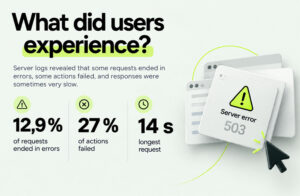
For users, the problem could show up in different ways:
- A shopper clicks a product while browsing the catalogue, but an error page opens instead.
- A shopper clicks “Save product”, but the button does not respond. More than a quarter of these actions failed.
- A first-time visitor waits longer than usual for a page to load. The slowest requests took 14 seconds.
The important point is that users may not realise they are experiencing a technical issue. They may simply close the page or go to another website.
What Google and AI tools could see
Search engines use automated crawlers to visit websites and collect information for search results. If a server returns an error when a crawler tries to access a page, the crawler cannot read that page’s content properly.
In this case, Googlebot received an error for 17.5% of its requests – more often than regular browsers, where the error rate was 12.9%
Google Search Console data showed how much the problem had grown. At the end of June, around 4,000 pages were inaccessible. Two months later, the number had risen to 18,467.
Because the catalogue uses filters, we initially might have expected many of the inaccessible URLs to be filter-generated addresses. The data told a different story: of 1,000 URLs reported by Google, 81% were standard product pages, while filtered URLs accounted for just 8.5%.
Eight out of ten URLs in the sample also had no parameters. They were ordinary product pages, with the product code at the end of the URL.
The problem was not limited to Google
Bing’s crawler did not receive a single successful response during the monitoring period. The cause was not website load, but a separate Cloudflare rule. The logs did not show when the rule had been introduced. While it remained active, Bing and Copilot may have continued relying on an increasingly outdated version of the site.
How AI crawlers differ
AI systems may access websites differently from traditional search crawlers. In this case, ChatGPT tried to access the site 56 times, and almost half of those requests ended in an error.
When an AI crawler cannot access a website, the system may draw on other information to generate its answer. The user may never know that the access attempt failed.
Retry patterns can differ too. Search crawlers revisit websites periodically, while an AI crawler’s request may be triggered by a specific user question. A failed attempt may therefore not be repeated in the same way.
Why the problem did not show up in reports
The online store had not received regular SEO attention for some time, so there were no ongoing SEO reports. Instead, the team focused on the metrics businesses typically monitor: sales, advertising performance and website traffic. None of these reports showed a sudden drop that would have prompted an investigation into a technical issue.
Even SEO reports would not necessarily have revealed the underlying cause. They mainly show outcomes such as impressions, clicks and rankings. If a crawler cannot access a page, reports are more likely to show the effects of the disruption than the server error itself.
The same applies to visitors. Someone who encounters an error and leaves may still appear in traffic statistics, but those statistics alone will not explain why they left.
In this case, the issue was visible in Google Search Console’s crawl statistics: the number of errors had been rising throughout the quarter. Because the data were not reviewed regularly, the warning went unnoticed.
The impact of this kind of issue may not look dramatic at first. Performance can gradually deteriorate or simply stop growing. Seasonality, an algorithm update or increased competition may all seem like plausible explanations, so a technical problem can go unnoticed until its effects become clear.
Why does this happen?
Here, the issue was not caused by one isolated error, but by several technical factors interacting.
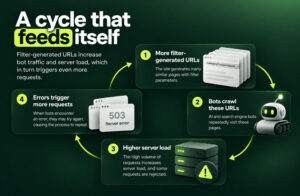
- Catalogue filters generate many URLs. Each filter selection or combination can create a separate web address. Crawlers treat each address as a URL to visit and check, even when its content differs very little from other filter combinations.
- The server has to process each request. The more URLs crawlers visit, the more requests the server must handle. Some of that work may be spent on pages that offer little value to users or search engines.
- Once the server’s protection threshold is reached, some requests are rejected. The server starts returning errors, which can affect both search crawlers and real visitors.
Crawl statistics showed that82% of Googlebot’s activity went towards revisiting pages it already knew about. In other words, the crawler was repeatedly returning to URLs it had visited before.
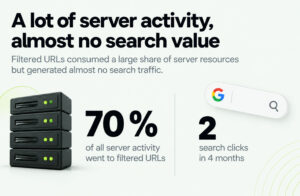
Another analysis showed how much server capacity was being used by filtered URLs. Over four months, these URLs had appeared in search results at least once but received just two clicks in total. Yet on the night analysed, they accounted for 70% of all server activity.
The filters themselves were not the problem, nor was the server protection on its own. The issue arose when a catalogue structure generating many URLs, intensive crawling and rules designed to limit excessive traffic began to interact.
How did this affect performance?
From mid-August, the site’s visibility began to decline. Search clicks fell from 340 to 235 per day over three weeks – a drop of almost one-third. Yet the average position remained unchanged, at around tenth place.
A comparison of individual days made the pattern clearer. On days with few server errors, the site received an average of 362 clicks. On days with many errors, it received 276. The average position was the same in both cases.
The year-on-year comparison showed a similar trend: average position improved, while clicks fell by almost one-third.
These figures do not prove that server errors caused the entire decline in clicks. However, the drop coincided with an increase in server errors, making it important to assess technical accessibility alongside search performance.
We also found that some search results were still showing outdated information. This may have been because Google could not revisit certain pages and read their updated content.
What needed to change
The main changes involved the site’s configuration and server performance.
Improve how filtered URLs are handled. Catalogue filters are useful, but not every URL they generate needs to be accessible to search crawlers. The site should distinguish URLs with genuine search value from those that consume server resources without delivering meaningful benefit.
Reduce the work required to serve popular pages. If the server has to generate the same page from scratch for every visit, the load increases. It is worth assessing whether frequently visited pages can be served from a cache or prepared in advance, reducing the work the server has to do.
Review the protection rules. Protection against excessive traffic is necessary, but its rules should not accidentally block regular visitors. In this case, the team needed to check how request limits were calculated and why ordinary visitors also received errors when those limits were reached.
Set up monitoring. Automated alerts should flag a significant increase in errors or a change in site speed. This would help the team spot a problem earlier, rather than months later.
Some of these changes have already been made, and work is continuing.
What to check on your own website
The same cycle can develop on other websites, particularly those with many filters, dynamically generated URLs and rules designed to limit excessive traffic. Start by finding out how much of your server traffic comes from bots. You can usually find this information in server logs or in the analytics provided by your security service.
It is also worth checking the crawl statistics in Google Search Console to see what proportion of requests end in server errors.
Five questions to ask your team or website administrator:
- What proportion of requests to our server end in an error? Check the server logs and, for part of the picture, the crawl statistics in Google Search Console.
- How many URLs do our catalogue filters generate, and how many are valuable in search? The total number matters, but so does how many of those URLs receive impressions or clicks.
- How much of our server traffic comes from bots? Visitor statistics alone usually do not tell the whole story. Check the server logs or your security service’s analytics.
- Can crawlers used by external SEO specialists access our website? A technical SEO audit can help establish this. If an external SEO tool cannot access the site properly, investigate why.
- Are clicks falling while rankings remain broadly the same? Google Search Console’s Performance report lets you compare clicks with average position. This pattern does not reveal the cause by itself, but it is a reason to investigate further.
What can you expect after fixing the issue?
If server errors, bot traffic or misconfigured protection rules are preventing access to a website, fixing them will not create new demand on its own. It can, however, help recover some of the traffic and accessibility lost because of technical barriers.
After the first changes were made, the typical server response became twice as fast. A search crawler that had previously received no successful responses also began crawling the site normally again.
Do not expect an immediate change in search performance. Search engines need time to revisit pages, and the final results depend not only on technical accessibility but also on other SEO and business factors.
We did not discover this issue by setting out to look for server errors. We came across it while working on something else. So if your reports look normal but performance is gradually worsening – or has simply stopped growing – it is worth checking what your usual reports do not show.
Reviewing server logs is one of our SEO services. We examine how the server responds to users and crawlers and help identify what needs to change.

