
A sudden spike in traffic from an unfamiliar country, hundreds of new backlinks, and an email offering to improve your SEO shortly afterwards. At first glance, this might look like growing interest in your website. But sometimes, behind these numbers are not people, but bots (automated programs) and link spam.
As part of our SEO services, we review the websites linking to our clients’ pages once a month. We use Ahrefs, a tool that discovers backlinks across the web and shows which websites link to a particular page and what text appears alongside each link.
During one such review, we noticed something unusual. Next to a link to a client’s online store was a lengthy testimonial in English, written in the first person, as if the client had written it themselves.
The testimonial claimed that website traffic had grown from 50 to 1,500 visitors in six months and that the website had reached the top three search results within three months. It also praised a specific SEO company and encouraged readers to use its services.
Our client had never written this testimonial. The same text had been published on 224 websites, including directory pages, forums, and hacked websites unrelated to the client’s business. These links can appear on a website in large numbers without its owner’s knowledge. This is known as link spam.
1. How bots and link spam affect your website
Link spam is usually unrelated to a website’s content or business activities and is not created to provide readers with useful information. In cases like this, we typically observe three things:
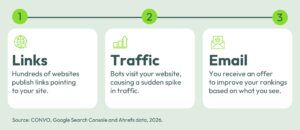
First, links appear in large numbers. As mentioned above, they may appear on various websites unrelated to your business. The text accompanying a link might include a fabricated testimonial written in your company’s name, promotional copy, a recommendation for another company’s services, or simply contact details, such as a Telegram handle.
Second, unusual traffic appears. Bots visit your pages and may perform actions that resemble those of real visitors. As a result, Analytics may record a large number of visits even though the number of actual visitors has not increased.
Third, you may receive an offer for SEO services. Someone at your company might receive an email mentioning your business, website, or even specific Analytics data. The aim may be to create the impression that something unusual is happening on your website and that you need SEO assistance. Such an email does not always arrive, and it may end up in your spam folder.
These three signs may occur together, but they are not necessarily part of the same campaign. If you receive an email like this, we recommend not replying or rushing to purchase the services being offered.
2. A real case of suspicious traffic and link spam
In our client’s case, the largest traffic spike recorded in Analytics came from Singapore. In one month, visits from this country increased so much that Singapore overtook Lithuania. However, the average visit duration was just 0.04 seconds. These visits were extremely brief, resembling bot activity far more than normal human browsing behaviour.
We compared the same period with data from Google Search Console. This tool shows how a website performs in Google Search and how often users click on its search results. The results were telling: Analytics recorded thousands of visits from Singapore, while Search Console recorded just nine clicks from that country over a 16-month period.
As the comparison below shows, Singapore did not even rank among the top ten countries by clicks from Google Search.
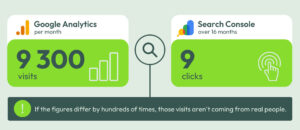
This does not mean that every discrepancy between Analytics and Search Console indicates bot activity. These tools measure different things, so their data can naturally differ. However, a very high volume of traffic from a country that is not a relevant market for your business, especially when combined with extremely short visits, is a reason to investigate traffic quality.
3. How to check for bots and link spam
Check your traffic. In Analytics, open the report by country and see where most of your traffic comes from. Pay attention to countries that generate an unexpectedly high number of visits given your business activities or primary markets.
Compare the data with Google Search Console. Select the same reporting period and check the data in Search Console. Under Performance, select the Countries tab. If Analytics shows thousands of visits from a particular country while Search Console records only a handful of clicks over the same period, this may indicate that a significant proportion of the traffic comes from bots.
Check new backlinks. You can use Ahrefs or Semrush to review the links pointing to your website. Look beyond the number of links: check where they have been published and what text appears alongside them. If links suddenly appear in large numbers on websites unrelated to your business, accompanied by fabricated testimonials or advertisements for other companies, this is a strong sign that you may be dealing with link spam.
4. Why you should pay attention to bots and link spam
You may end up making decisions based on distorted data. An increase in traffic shown in Analytics can create the impression that your marketing efforts are working, even when enquiries or purchases have not increased. That is why it is important to evaluate not only overall traffic growth but also its sources and quality.
You may receive a convincing-looking sales pitch. An email offering SEO services can seem credible because it arrives just as you notice an unusual change in Analytics. However, this change does not necessarily mean your website needs additional SEO services. Responding to such an offer may lead to even more similar links or emails.
Fabricated content may be published in your company’s name. In the case we investigated, the same text appeared on 224 websites, making it look as though the company was a satisfied client of a particular SEO agency and recommended its services. These pages do not necessarily appear in Google Search results, but people researching your company before entering into a business relationship may still come across them while checking your backlinks.
5. What to do about suspicious traffic and spam backlinks
Google may recognise these links and ignore them, so their mere appearance does not usually mean your website’s search rankings will suffer. There is no need to take immediate action solely because these links have appeared.
Do not share login credentials or grant access. Emails of this kind sometimes request access to your website, server, or Search Console account. The fact that external links have appeared on your website does not give their creators any access to it. Sharing credentials or granting access can pose a genuine security risk.
Do not rush to block traffic at the server level. If you block bot traffic only from this point onwards, it will remain in your historical data but disappear from newer reports. This can make it harder to compare periods and assess how traffic patterns change over time.
Enable notifications for new backlinks. Ahrefs and Semrush can automatically notify you when new backlinks are discovered. This helps you spot an unusual increase earlier rather than only noticing it by chance when reviewing reports.
Use Google’s Disavow tool only in exceptional cases. If your website has received, or may receive, a manual action from Google because of artificial or spammy links, you should first try to have those links removed. If that is not possible, the Disavow tool can be used to tell Google which links or domains to ignore. The appearance of unusual backlinks alone is not a reason to use this tool.
6. When should you consult a specialist?
Jei su tokia situacija susiduriate pirmą kartą, pagrindinius požymius galite pasitikrinti ir patys. Į specialistą verta kreiptis, jei neįprastos srauto ar nuorodų bangos kartojasi, duomenys tampa sunkiai interpretuojami arba kartu pastebite kitų svetainės matomumo pokyčių.
In our client’s case, these spikes occurred three times over five months, each time accompanied by a different testimonial. However, this example alone does not mean the same pattern will occur on every website.
The most important thing is to distinguish between two separate issues: unwanted traffic and an actual SEO problem. The presence of bots or link spam does not, by itself, explain declining search rankings. If your rankings are genuinely falling, you need to investigate the broader reasons behind the change.
Monitoring backlinks and traffic is part of our ongoing SEO work. This allows us to identify unusual changes and assess them alongside other website data.
Get in touch or learn more about our SEO services.
F.A.Q
Can link spam harm my website’s search rankings?
The appearance of unwanted links pointing to your website does not necessarily mean they will harm your rankings. Google may ignore these links. If a manual action is imposed on your website, a separate notification will appear in Search Console.
Why does Ahrefs show hundreds of new backlinks that do not appear in Search Console?
These tools collect and report different types of data. Ahrefs uses its own crawlers to discover links across the web, while Search Console provides data about Google Search and your website’s visibility in search results. Therefore, hundreds of backlinks discovered by Ahrefs will not necessarily appear in Search Console.
Can spam backlinks be removed?
You cannot remove links yourself if they have been published on websites you do not own. You can contact the administrators of those websites and ask them to remove the links, but this is rarely practical when dealing with large-scale link spam. In most cases, no further action is necessary.
Does bot traffic harm a website?
Bot traffic does not necessarily harm a website’s search rankings. However, it can distort Analytics data: your website may record a large number of visits even though the number of real visitors has not changed. This can make it harder to evaluate marketing performance accurately and make informed decisions.
Does an email offering SEO services always follow the appearance of spam backlinks?
No. Backlinks may appear without any subsequent contact. If an email is sent, it may not reach your main inbox and could end up in your spam folder.
Data from Google Search Console and Ahrefs collected in September 2026.

